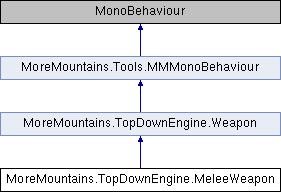
A basic melee weapon class, that will activate a "hurt zone" when the weapon is used.
More...
|
| override void | Initialization () |
| | Initialization.
|
| override void | WeaponUse () |
| | When the weapon is used, we trigger our attack routine.
|
| override void | Interrupt () |
| | On interrupt, we stop our damage area sequence if needed.
|
| virtual void | InitializeComboWeapons () |
| | Initializes the combo weapon, if it's one.
|
| virtual void | SetOwner (Character newOwner, CharacterHandleWeapon handleWeapon) |
| | Sets the weapon's owner.
|
| virtual void | WeaponInputStart () |
| | Called by input, turns the weapon on.
|
| virtual void | WeaponInputReleased () |
| | Describes what happens when the weapon's input gets released.
|
| virtual void | TurnWeaponOn () |
| | Describes what happens when the weapon starts.
|
| virtual void | CaseWeaponIdle () |
| | If the weapon is idle, we reset the movement multiplier.
|
| virtual void | CaseWeaponStart () |
| | When the weapon starts we switch to a delay or shoot based on our weapon's settings.
|
| virtual void | CaseWeaponDelayBeforeUse () |
| | If we're in delay before use, we wait until our delay is passed and then request a shoot.
|
| virtual void | CaseWeaponUse () |
| | On weapon use we use our weapon then switch to delay between uses.
|
| virtual void | CaseWeaponDelayBetweenUses () |
| | When in delay between uses, we either turn our weapon off or make a shoot request.
|
| virtual void | CaseWeaponStop () |
| | On weapon stop, we switch to idle.
|
| virtual void | CaseWeaponReloadNeeded () |
| | If a reload is needed, we mention it and switch to idle.
|
| virtual void | CaseWeaponReloadStart () |
| | on reload start, we reload the weapon and switch to reload
|
| virtual void | CaseWeaponReload () |
| | on reload, we reset our movement multiplier, and switch to reload stop once our reload delay has passed
|
| virtual void | CaseWeaponReloadStop () |
| | on reload stop, we swtich to idle and load our ammo
|
| virtual void | CaseWeaponInterrupted () |
| | on weapon interrupted, we turn our weapon off and switch back to idle
|
| virtual IEnumerator | ShootRequestCo () |
| | Determines whether or not the weapon can fire.
|
| virtual void | ShootRequest () |
| virtual void | WeaponInputStop () |
| | Called by input, turns the weapon off if in auto mode.
|
| virtual void | TurnWeaponOff () |
| | Turns the weapon off.
|
| virtual void | ReloadNeeded () |
| | Describes what happens when the weapon needs a reload.
|
| virtual void | InitiateReloadWeapon () |
| | Initiates a reload.
|
| virtual void | FlipWeapon () |
| | Flips the weapon.
|
| virtual IEnumerator | WeaponDestruction () |
| | Destroys the weapon.
|
| virtual void | ApplyOffset () |
| | Applies the offset specified in the inspector.
|
| virtual void | InitializeAnimatorParameters () |
| | Adds required animator parameters to the animator parameters list if they exist.
|
| virtual void | UpdateAnimator () |
| | Override this to send parameters to the character's animator. This is called once per cycle, by the Character class, after Early, normal and Late process().
|
|
| MeleeDamageAreaModes | MeleeDamageAreaMode = MeleeDamageAreaModes.Generated |
| | the possible modes to handle the damage area. In Generated, the MeleeWeapon will create it, in Existing, you can bind an existing damage area - usually nested under the weapon
|
| MeleeDamageAreaShapes | DamageAreaShape = MeleeDamageAreaShapes.Rectangle |
| | the shape of the damage area (rectangle or circle)
|
| Vector3 | AreaOffset = new Vector3(1, 0) |
| | the offset to apply to the damage area (from the weapon's attachment position
|
| Vector3 | AreaSize = new Vector3(1, 1) |
| | the size of the damage area
|
| DamageOnTouch.TriggerAndCollisionMask | TriggerFilter = DamageOnTouch.AllowedTriggerCallbacks |
| | the trigger filters this melee weapon should apply damage on (by default, it'll apply damage on everything, but you can change this to only apply when targets enter the area, for example)
|
| MMFeedbacks | HitDamageableFeedback |
| | the feedback to play when hitting a Damageable
|
| MMFeedbacks | HitNonDamageableFeedback |
| | the feedback to play when hitting a non Damageable
|
| DamageOnTouch | ExistingDamageArea |
| | an existing damage area to activate/handle as the weapon is used
|
| float | InitialDelay = 0f |
| | the initial delay to apply before triggering the damage area
|
| float | ActiveDuration = 1f |
| | the duration during which the damage area is active
|
| LayerMask | TargetLayerMask |
| | the layers that will be damaged by this object
|
| float | MinDamageCaused = 10f |
| | The min amount of health to remove from the player's health.
|
| float | MaxDamageCaused = 10f |
| | The max amount of health to remove from the player's health.
|
| DamageOnTouch.KnockbackStyles | Knockback |
| | the kind of knockback to apply
|
| Vector3 | KnockbackForce = new Vector3(10, 2, 0) |
| | The force to apply to the object that gets damaged.
|
| DamageOnTouch.KnockbackDirections | KnockbackDirection = DamageOnTouch.KnockbackDirections.BasedOnOwnerPosition |
| | The direction in which to apply the knockback.
|
| float | InvincibilityDuration = 0.5f |
| | The duration of the invincibility frames after the hit (in seconds)
|
| bool | CanDamageOwner = false |
| | if this is true, the owner can be damaged by its own weapon's damage area (usually false)
|
| string | WeaponName |
| | the name of the weapon, only used for debugging
|
| bool | WeaponCurrentlyActive = true |
| | whether or not the weapon is currently active
|
| bool | InputAuthorized = true |
| | if this is true, this weapon will be able to read input (usually via the CharacterHandleWeapon ability), otherwise player input will be disabled
|
| TriggerModes | TriggerMode = TriggerModes.Auto |
| | is this weapon on semi or full auto ?
|
| float | DelayBeforeUse = 0f |
| | the delay before use, that will be applied for every shot
|
| bool | DelayBeforeUseReleaseInterruption = true |
| | whether or not the delay before used can be interrupted by releasing the shoot button (if true, releasing the button will cancel the delayed shot)
|
| float | TimeBetweenUses = 1f |
| | the time (in seconds) between two shots
|
| bool | TimeBetweenUsesReleaseInterruption = true |
| | whether or not the time between uses can be interrupted by releasing the shoot button (if true, releasing the button will cancel the time between uses)
|
| bool | UseBurstMode = false |
| | if this is true, the weapon will activate repeatedly for every shoot request
|
| int | BurstLength = 3 |
| | the amount of 'shots' in a burst sequence
|
| float | BurstTimeBetweenShots = 0.1f |
| | the time between shots in a burst sequence (in seconds)
|
| bool | MagazineBased = false |
| | whether or not the weapon is magazine based. If it's not, it'll just take its ammo inside a global pool
|
| int | MagazineSize = 30 |
| | the size of the magazine
|
| bool | AutoReload |
| | if this is true, pressing the fire button when a reload is needed will reload the weapon. Otherwise you'll need to press the reload button
|
| bool | NoInputReload = false |
| | if this is true, reload will automatically happen right after the last bullet is shot, without the need for input
|
| float | ReloadTime = 2f |
| | the time it takes to reload the weapon
|
| int | AmmoConsumedPerShot = 1 |
| | the amount of ammo consumed everytime the weapon fires
|
| bool | AutoDestroyWhenEmpty |
| | if this is set to true, the weapon will auto destroy when there's no ammo left
|
| float | AutoDestroyWhenEmptyDelay = 1f |
| | the delay (in seconds) before weapon destruction if empty
|
| bool | PreventReloadIfAmmoEmpty = false |
| | if this is true, the weapon won't try and reload if the ammo is empty, when using WeaponAmmo
|
| int | CurrentAmmoLoaded = 0 |
| | the current amount of ammo loaded inside the weapon
|
| Vector3 | WeaponAttachmentOffset = Vector3.zero |
| | an offset that will be applied to the weapon once attached to the center of the WeaponAttachment transform.
|
| bool | FlipWeaponOnCharacterFlip = true |
| | should that weapon be flipped when the character flips?
|
| Vector3 | RightFacingFlipValue = new Vector3(1, 1, 1) |
| | the FlipValue will be used to multiply the model's transform's localscale on flip. Usually it's -1,1,1, but feel free to change it to suit your model's specs
|
| Vector3 | LeftFacingFlipValue = new Vector3(-1, 1, 1) |
| | the FlipValue will be used to multiply the model's transform's localscale on flip. Usually it's -1,1,1, but feel free to change it to suit your model's specs
|
| Transform | WeaponUseTransform |
| | a transform to use as the spawn point for weapon use (if null, only offset will be considered, otherwise the transform without offset)
|
| bool | WeaponShouldFlip = true |
| | if this is true, the weapon will flip to match the character's orientation
|
| Transform | LeftHandHandle |
| | the transform to which the character's left hand should be attached to
|
| Transform | RightHandHandle |
| | the transform to which the character's right hand should be attached to
|
| bool | ModifyMovementWhileAttacking = false |
| | if this is true, a multiplier will be applied to movement while the weapon is active
|
| float | MovementMultiplier = 0f |
| | the multiplier to apply to movement while attacking
|
| bool | PreventAllMovementWhileInUse = false |
| | if this is true all movement will be prevented (even flip) while the weapon is active
|
| bool | PreventAllAimWhileInUse = false |
| | if this is true all aim will be prevented while the weapon is active
|
| float | RecoilForce = 0f |
| | the force to apply to push the character back when shooting - positive values will push the character back, negative values will launch it forward, turning that recoil into a thrust
|
| List< Animator > | Animators |
| | the other animators (other than the Character's) that you want to update every time this weapon gets used
|
| bool | PerformAnimatorSanityChecks = false |
| | If this is true, sanity checks will be performed to make sure animator parameters exist before updating them. Turning this to false will increase performance but will throw errors if you're trying to update non existing parameters. Make sure your animator has the required parameters.
|
| bool | MirrorCharacterAnimatorParameters = false |
| | if this is true, the weapon's animator(s) will mirror the animation parameter of the owner character (that way your weapon's animator will be able to "know" if the character is walking, jumping, etc)
|
| int | WeaponAnimationID = 0 |
| | the ID of the weapon to pass to the animator
|
| string | IdleAnimationParameter |
| | the name of the weapon's idle animation parameter : this will be true all the time except when the weapon is being used
|
| string | StartAnimationParameter |
| | the name of the weapon's start animation parameter : true at the frame where the weapon starts being used
|
| string | DelayBeforeUseAnimationParameter |
| | the name of the weapon's delay before use animation parameter : true when the weapon has been activated but hasn't been used yet
|
| string | SingleUseAnimationParameter |
| | the name of the weapon's single use animation parameter : true at each frame the weapon activates (shoots)
|
| string | UseAnimationParameter |
| | the name of the weapon's in use animation parameter : true at each frame the weapon has started firing but hasn't stopped yet
|
| string | DelayBetweenUsesAnimationParameter |
| | the name of the weapon's delay between each use animation parameter : true when the weapon is in use
|
| string | StopAnimationParameter |
| | the name of the weapon stop animation parameter : true after a shot and before the next one or the weapon's stop
|
| string | ReloadStartAnimationParameter |
| | the name of the weapon reload start animation parameter
|
| string | ReloadAnimationParameter |
| | the name of the weapon reload animation parameter
|
| string | ReloadStopAnimationParameter |
| | the name of the weapon reload end animation parameter
|
| string | WeaponAngleAnimationParameter |
| | the name of the weapon's angle animation parameter
|
| string | WeaponAngleRelativeAnimationParameter |
| | the name of the weapon's angle animation parameter, adjusted so it's always relative to the direction the character is currently facing
|
| string | EquippedAnimationParameter |
| | the name of the parameter to send to true as long as this weapon is equipped, used or not. While all the other parameters defined here are updated by the Weapon class itself, and passed to the weapon and character, this one will be updated by CharacterHandleWeapon only."
|
| string | InterruptedAnimationParameter |
| | the name of the parameter to send to true when the weapon gets interrupted. While all the other parameters defined here are updated by the Weapon class itself, and passed to the weapon and character, this one will be updated by CharacterHandleWeapon only."
|
| MMFeedbacks | WeaponStartMMFeedback |
| | the feedback to play when the weapon starts being used
|
| MMFeedbacks | WeaponUsedMMFeedback |
| | the feedback to play while the weapon is in use
|
| MMFeedbacks | WeaponUsedMMFeedbackAlt |
| | if set, this feedback will be used randomly instead of WeaponUsedMMFeedback
|
| MMFeedbacks | WeaponStopMMFeedback |
| | the feedback to play when the weapon stops being used
|
| MMFeedbacks | WeaponReloadMMFeedback |
| | the feedback to play when the weapon gets reloaded
|
| MMFeedbacks | WeaponReloadNeededMMFeedback |
| | the feedback to play when the weapon gets reloaded
|
| MMFeedbacks | WeaponReloadImpossibleMMFeedback |
| | the feedback to play when the weapon can't reload as there's no more ammo available. You'll need PreventReloadIfAmmoEmpty to be true for this to work
|
| bool | InitializeOnStart = false |
| | If this is true, the weapon will initialize itself on start, otherwise it'll have to be init manually, usually by the CharacterHandleWeapon class.
|
| bool | Interruptable = false |
| | whether or not this weapon can be interrupted
|
| bool | Flipped |
| | if true, the weapon is flipped
|
| MMStateMachine< WeaponStates > | WeaponState |
| | the weapon's state machine
|
A basic melee weapon class, that will activate a "hurt zone" when the weapon is used.

 1.14.0