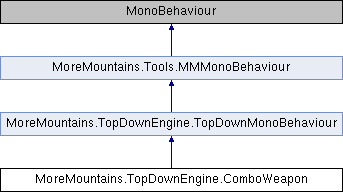
Add this component to an object containing multiple weapons and it'll turn it into a ComboWeapon, allowing you to chain attacks from all the different weapons.
More...
|
| virtual void | Initialization () |
| | Grabs all Weapon components and initializes them.
|
| virtual void | ResetCombo () |
| | Resets the combo if enough time has passed since the last attack.
|
| virtual void | WeaponStarted (Weapon weaponThatStarted) |
| | When one of the weapons get used we turn our countdown off.
|
| virtual void | WeaponStopped (Weapon weaponThatStopped) |
| | When one of the weapons has ended its attack, we start our countdown and switch to the next weapon.
|
| virtual void | ProceedToNextWeapon () |
| virtual void | FlipUnusedWeapons () |
| | Flips all unused weapons so they remain properly oriented.
|
|
| bool | ComboInProgress [get] |
| | True if a combo is in progress, false otherwise.
|
Add this component to an object containing multiple weapons and it'll turn it into a ComboWeapon, allowing you to chain attacks from all the different weapons.
◆ InputModes
◆ FlipUnusedWeapons()
| virtual void MoreMountains.TopDownEngine.ComboWeapon.FlipUnusedWeapons |
( |
| ) |
|
|
virtual |
Flips all unused weapons so they remain properly oriented.
◆ Initialization()
| virtual void MoreMountains.TopDownEngine.ComboWeapon.Initialization |
( |
| ) |
|
|
virtual |
Grabs all Weapon components and initializes them.
◆ InitializeUnusedWeapons()
| virtual void MoreMountains.TopDownEngine.ComboWeapon.InitializeUnusedWeapons |
( |
| ) |
|
|
protectedvirtual |
Initializes all unused weapons.
◆ ProceedToNextWeapon()
| virtual void MoreMountains.TopDownEngine.ComboWeapon.ProceedToNextWeapon |
( |
| ) |
|
|
virtual |
◆ ResetCombo()
| virtual void MoreMountains.TopDownEngine.ComboWeapon.ResetCombo |
( |
| ) |
|
|
virtual |
Resets the combo if enough time has passed since the last attack.
◆ Start()
| virtual void MoreMountains.TopDownEngine.ComboWeapon.Start |
( |
| ) |
|
|
protectedvirtual |
On start we initialize our Combo Weapon.
◆ Update()
| virtual void MoreMountains.TopDownEngine.ComboWeapon.Update |
( |
| ) |
|
|
protectedvirtual |
On Update we reset our combo if needed.
◆ WeaponStarted()
| virtual void MoreMountains.TopDownEngine.ComboWeapon.WeaponStarted |
( |
Weapon | weaponThatStarted | ) |
|
|
virtual |
When one of the weapons get used we turn our countdown off.
- Parameters
-
◆ WeaponStopped()
| virtual void MoreMountains.TopDownEngine.ComboWeapon.WeaponStopped |
( |
Weapon | weaponThatStopped | ) |
|
|
virtual |
When one of the weapons has ended its attack, we start our countdown and switch to the next weapon.
- Parameters
-
◆ _countdownActive
| bool MoreMountains.TopDownEngine.ComboWeapon._countdownActive = false |
|
protected |
◆ _currentWeaponIndex
| int MoreMountains.TopDownEngine.ComboWeapon._currentWeaponIndex = 0 |
|
protected |
◆ _weaponAutoShoot
◆ ComboInProgressAnimationParameter
| string MoreMountains.TopDownEngine.ComboWeapon.ComboInProgressAnimationParameter = "ComboInProgress" |
the name of the animation parameter to update when a combo is in progress.
◆ DropComboDelay
| float MoreMountains.TopDownEngine.ComboWeapon.DropComboDelay = 0.5f |
the delay after which the combo drops
◆ DroppableCombo
| bool MoreMountains.TopDownEngine.ComboWeapon.DroppableCombo = true |
whether or not the combo can be dropped if enough time passes between two consecutive attacks
◆ InputMode
the input mode for this combo weapon. In Auto mode, you'll want to make sure you've set ContinuousPress:true on your CharacterHandleWeapon ability
◆ OwnerCharacterHandleWeapon
the reference to the weapon's Owner
◆ TimeSinceLastWeaponStopped
| float MoreMountains.TopDownEngine.ComboWeapon.TimeSinceLastWeaponStopped |
the time spent since the last weapon stopped
◆ Weapons
| Weapon [] MoreMountains.TopDownEngine.ComboWeapon.Weapons |
the list of weapons, set automatically by the class
◆ ComboInProgress
| bool MoreMountains.TopDownEngine.ComboWeapon.ComboInProgress |
|
get |
True if a combo is in progress, false otherwise.
- Returns
The documentation for this class was generated from the following file:
- H:/Code/MoreMountains/topdownengine/Assets/TopDownEngine/Common/Scripts/Characters/Weapons/ComboWeapon.cs

 1.14.0