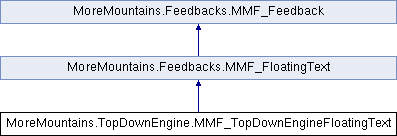
This feedback lets you trigger the appearance of a floating text, that will reflect the damage done to the target Health component. This requires that a MMFloatingTextSpawner be correctly setup in the scene, otherwise nothing will happen. To do so, create a new empty object, add a MMFloatingTextSpawner to it. Drag (at least) one MMFloatingText prefab into its PooledSimpleMMFloatingText slot. You'll find such prefabs already made in the MMTools/Tools/MMFloatingText/Prefabs folder, but feel free to create your own.
More...
|
| Health | TargetHealth |
| | the Health component where damage data should be read
|
| string | Formatting = "" |
| bool | DamageDirectionImpactsTextDirection = false |
| | whether or not the direction of the damage should impact the direction of the floating text
|
| float | DamageDirectionMultiplier = 0.5f |
| | the multiplier to apply to the damage direction. Usually you'll want it to be less than 1. With a value of 0.5, a character being hit from the left will spawn a floating text at a 45° up/right angle
|
| float | Intensity = 1f |
| | the Intensity to spawn this text with, will act as a lifetime/movement/scale multiplier based on the spawner's settings
|
| string | Value = "100" |
| | the value to display when spawning this text
|
| bool | UseIntensityAsValue = false |
| | if this is true, the intensity passed to this feedback will be the value displayed
|
| RoundingMethods | RoundingMethod = RoundingMethods.NoRounding |
| | the rounding methods to apply to the output value (when using intensity as the output value, string values won't get rounded)
|
| bool | ForceColor = false |
| | whether or not to force a color on the new text, if not, the default colors of the spawner will be used
|
| Gradient | AnimateColorGradient = new Gradient() |
| | the gradient to apply over the lifetime of the text
|
| bool | ForceLifetime = false |
| | whether or not to force a lifetime on the new text, if not, the default colors of the spawner will be used
|
| float | Lifetime = 0.5f |
| | the forced lifetime for the spawned text
|
| PositionModes | PositionMode = PositionModes.FeedbackPosition |
| | where to spawn the new text (at the position of the feedback, or on a specified Transform)
|
| Transform | TargetTransform |
| | in transform mode, the Transform on which to spawn the new floating text
|
| Vector3 | Direction = Vector3.zero |
| | the direction to apply to the new floating text (leave it to 0 to let the Spawner decide based on its settings)
|
| Transform | AttachmentTransform |
| | a transform to attach the floating text to for the duration of its lifetime. it will then move relative to it
|
| bool | Active = true |
| | whether or not this feedback is active
|
| int | UniqueID |
| string | Label = "MMFeedback" |
| | the name of this feedback to display in the inspector
|
| string | OriginalLabel = "" |
| | the original label of this feedback, used to display next to the custom label in case we set one
|
| MMChannelModes | ChannelMode = MMChannelModes.Int |
| int | Channel = 0 |
| | the ID of the channel on which this feedback will communicate
|
| MMChannel | MMChannelDefinition = null |
| float | Chance = 100f |
| | the chance of this feedback happening (in percent : 100 : happens all the time, 0 : never happens, 50 : happens once every two calls, etc)
|
| MMFeedbackTiming | Timing |
| | a number of timing-related values (delay, repeat, etc)
|
| MMFeedbackTargetAcquisition | AutomatedTargetAcquisition |
| | a set of settings letting you define automated target acquisition for this feedback, to (for example) automatically grab the target on this game object, or a parent, a child, or on a reference holder
|
| bool | RandomizeOutput = false |
| | if this is true, intensity will be multiplied by a random value on play, picked between RandomMultiplier.x and RandomMultiplier.y
|
| Vector2 | RandomMultiplier = new Vector2(0.8f, 1f) |
| | a random value (randomized between its x and y) by which to multiply the output of this feedback, if RandomizeOutput is true
|
| bool | RandomizeDuration = false |
| | if this is true, this feedback's duration will be multiplied by a random value on play, picked between RandomDurationMultiplier.x and RandomDurationMultiplier.y
|
| Vector2 | RandomDurationMultiplier = new Vector2(0.5f, 2f) |
| | a random value (randomized between its x and y) by which to multiply the duration of this feedback, if RandomizeDuration is true
|
| bool | UseRange = false |
| | if this is true, only shakers within the specified range will respond to this feedback
|
| float | RangeDistance = 5f |
| | when in UseRange mode, only shakers within that distance will respond to this feedback
|
| bool | UseRangeFalloff = false |
| | when in UseRange mode, whether or not to modify the shake intensity based on the RangeFallOff curve
|
| AnimationCurve | RangeFalloff = new AnimationCurve(new Keyframe(0f, 1f), new Keyframe(1f, 0f)) |
| | the animation curve to use to define falloff (on the x 0 represents the range center, 1 represents the max distance to it)
|
| Vector2 | RemapRangeFalloff = new Vector2(0f, 1f) |
| | the values to remap the falloff curve's y axis' 0 and 1
|
| MMF_Button | AutomaticShakerSetupButton |
| | a button used to attempt an auto shaker setup for this feedback, adding whatever shaker it requires to function to the scene
|
| MMF_Player | Owner |
| | the Owner of the feedback, as defined when calling the Initialization method
|
| bool | DebugActive = false |
| | whether or not this feedback is in debug mode
|
|
| override void | CustomPlayFeedback (Vector3 position, float attenuation=1.0f) |
| | On play, we ask for a floating text to be spawned.
|
| override void | CustomPlayFeedback (Vector3 position, float feedbacksIntensity=1.0f) |
| | On play we ask the spawner on the specified channel to spawn a new floating text.
|
| virtual float | ApplyRounding (float value) |
| virtual void | AutomateTargetAcquisitionInternal () |
| | Performs automated target acquisition, if needed.
|
| virtual void | AutomateTargetAcquisition () |
| | A method meant to be implemented per feedback letting you specify what happens (usually setting a target)
|
| virtual GameObject | FindAutomatedTargetGameObject () |
| virtual T | FindAutomatedTarget< T > () |
| virtual IEnumerator | PlayCoroutine (Vector3 position, float feedbacksIntensity=1.0f) |
| | An internal coroutine delaying the initial play of the feedback.
|
| virtual void | RegularPlay (Vector3 position, float feedbacksIntensity=1.0f) |
| | Triggers delaying coroutines if needed.
|
| virtual void | TriggerCustomPlay (Vector3 position, float intensity) |
| | Triggers a custom play.
|
| virtual IEnumerator | InfinitePlay (Vector3 position, float feedbacksIntensity=1.0f) |
| | Internal coroutine used for repeated play without end.
|
| virtual IEnumerator | RepeatedPlay (Vector3 position, float feedbacksIntensity=1.0f) |
| | Internal coroutine used for repeated play.
|
| virtual IEnumerator | TriggerRepeatedPlay (Vector3 position, float feedbacksIntensity=1.0f) |
| virtual IEnumerator | SequenceCoroutine (Vector3 position, float feedbacksIntensity=1.0f) |
| | A coroutine used to play this feedback on a sequence.
|
| virtual IEnumerator | ForceInitialValueDelayedCo (Vector3 position, float feedbacksIntensity=1.0f) |
| | A coroutine used to delay the Stop when forcing initial values (used mostly with shaker based feedbacks)
|
| virtual float | ApplyTimeMultiplier (float duration) |
| | Applies the host MMFeedbacks' time multiplier to this feedback.
|
| virtual IEnumerator | WaitFor (float delay) |
| | Internal method used to wait for a duration, on scaled or unscaled time.
|
| virtual float | ApplyDirection (float normalizedTime) |
| | Returns a new value of the normalized time based on the current play direction of this feedback.
|
| virtual void | CustomInitialization (MMF_Player owner) |
| | This method describes all custom initialization processes the feedback requires, in addition to the main Initialization method.
|
| void | CustomPlayFeedback (Vector3 position, float feedbacksIntensity=1.0f) |
| | This method describes what happens when the feedback gets played.
|
| virtual void | CustomStopFeedback (Vector3 position, float feedbacksIntensity=1.0f) |
| | This method describes what happens when the feedback gets stopped.
|
| virtual void | CustomSkipToTheEnd (Vector3 position, float feedbacksIntensity=1.0f) |
| | This method describes what happens when the feedback gets skipped to the end.
|
| virtual void | CustomRestoreInitialValues () |
| | This method describes what happens when the feedback gets restored.
|
| virtual void | CustomPlayerComplete () |
| | This method describes what happens when the player this feedback belongs to completes playing.
|
| virtual void | CustomReset () |
| | This method describes what happens when the feedback gets reset.
|
|
| enum | PositionModes { TargetTransform
, FeedbackPosition
, PlayPosition
} |
| | the possible places where the floating text should spawn at More...
|
| enum | RoundingMethods { NoRounding
, Round
, Ceil
, Floor
} |
| | the possible methods that can be applied to the output value (when using intensity as the output value, string values won't get rounded) More...
|
| virtual string | GetLabel () |
| | you can override this when creating a custom feedback to have it behave differently and display a different label
|
| virtual float | ComputeIntensity (float intensity, Vector3 position) |
| | Computes the new intensity, taking into account constant intensity and potential randomness.
|
| virtual void | CacheRequiresSetup () |
| virtual bool | EvaluateRequiresSetup () |
| | Override this method to determine if a feedback requires setup.
|
| virtual void | SetFeedbackDuration (float newDuration) |
| | Use this method to change the duration of this feedback.
|
| virtual void | PreInitialization (MMF_Player owner, int index) |
| | Runs at Awake, lets you preinitialize your custom feedback before Initialization.
|
| virtual void | Initialization (MMF_Player owner, int index) |
| | Typically runs on Start, Initializes the feedback and its timing related variables.
|
| virtual void | SetIndexInFeedbacksList (int index) |
| | Lets you specify at what index this feedback is in the list - use carefully (or don't use at all)
|
| virtual void | AutomaticShakerSetup () |
| | Call this method (either directly or via the inspector button) to try and automatically setup this feedback's corresponding shaker in the scene.
|
| virtual void | ForceAutomateTargetAcquisition () |
| | Lets you force target acquisition, outside of initialization where it usually occurs.
|
| virtual void | Play (Vector3 position, float feedbacksIntensity=1.0f) |
| | Plays the feedback.
|
| virtual void | SetSequence (MMSequence newSequence) |
| | Use this method to change this feedback's sequence at runtime.
|
| virtual void | Stop (Vector3 position, float feedbacksIntensity=1.0f) |
| | Stops all feedbacks from playing. Will stop repeating feedbacks, and call custom stop implementations.
|
| virtual void | SkipToTheEnd (Vector3 position, float feedbacksIntensity=1.0f) |
| | Called when skipping to the end of MMF_Player, calls custom Skip on all feedbacks.
|
| virtual void | ForceInitialValue (Vector3 position, float feedbacksIntensity=1.0f) |
| | Forces the feedback to set its initial value (behavior will change from feedback to feedback, but for example, a Position feedback that moves a Transform from point A to B would automatically move the Transform to point A when ForceInitialState is called.
|
| virtual void | RestoreInitialValues () |
| | Called when restoring the initial state of a player, calls custom Restore on all feedbacks.
|
| virtual void | ResetFeedback () |
| | Calls this feedback's custom reset.
|
| virtual void | ResetCooldown () |
| | Resets the cooldown for this feedback, allowing it to be played again instantly.
|
| virtual void | PlayerComplete () |
| | This gets called by the MMF Player when all feedbacks have completed playing.
|
| virtual void | SetDelayBetweenRepeats (float delay) |
| | Use this method to specify a new delay between repeats at runtime.
|
| virtual void | SetInitialDelay (float delay) |
| | Use this method to specify a new initial delay at runtime.
|
| virtual void | ComputeNewRandomDurationMultiplier () |
| | Computes a new random duration multiplier.
|
| virtual void | ResetPlayCount () |
| | Resets the play count of this feedback.
|
| virtual void | ComputeTotalDuration () |
| | Computes the total duration of this feedback.
|
| virtual void | InitializeCustomAttributes () |
| | Use this method to initialize any custom attributes you may have.
|
| virtual void | OnValidate () |
| | Triggered when a change happens in the inspector.
|
| virtual void | OnAddFeedback () |
| | Triggered when the feedback gets added to the player.
|
| virtual void | OnDestroy () |
| | Triggered when that feedback gets destroyed.
|
| virtual void | OnDisable () |
| | Triggered when the host MMF Player gets disabled.
|
| virtual void | OnDrawGizmosSelectedHandler () |
| | Triggered when the host MMF Player gets selected, can be used to draw gizmos.
|
| static bool | FeedbackTypeAuthorized = true |
| | a static bool used to disable all feedbacks of this type at once
|
| const string | _randomnessGroupName = "Feedback Randomness" |
| const string | _rangeGroupName = "Feedback Range" |
| const string | _automaticSetupGroupName = "Automatic Setup" |
| Vector3 | _playPosition |
| string | _value |
| float | _lastPlayTimestamp = -float.MaxValue |
| int | _playsLeft |
| bool | _initialized = false |
| Coroutine | _playCoroutine |
| Coroutine | _infinitePlayCoroutine |
| Coroutine | _sequenceCoroutine |
| Coroutine | _repeatedPlayCoroutine |
| bool | _requiresSetup = false |
| string | _requiredTarget = "" |
| float | _randomDurationMultiplier = 1f |
| int | _sequenceTrackID = 0 |
| float | _beatInterval |
| bool | BeatThisFrame = false |
| int | LastBeatIndex = 0 |
| int | CurrentSequenceIndex = 0 |
| float | LastBeatTimestamp = 0f |
| MMChannelData | _channelData |
| float | _totalDuration = 0f |
| int | _indexInOwnerFeedbackList = 0 |
| string | _requiredTargetTextCached = "." |
| string | _requiredTargetTextCachedExtra = "" |
| float | _repeatOffset = 0f |
| override float | FeedbackDuration [get, set] |
| | sets the inspector color for this feedback
|
| override bool | HasChannel [get] |
| override bool | HasRandomness [get] |
| virtual Color | DisplayColor [get] |
| | use this color to customize the background color of the feedback in the MMF_Player's list
|
| virtual IEnumerator | Pause [get] |
| | set this to true if your feedback should pause the execution of the feedback sequence
|
| virtual bool | HoldingPause [get] |
| | if this is true, this feedback will wait until all previous feedbacks have run
|
| virtual bool | LooperPause [get] |
| | if this is true, this feedback will wait until all previous feedbacks have run, then run all previous feedbacks again
|
| virtual bool | ScriptDrivenPause [get, set] |
| | if this is true, this feedback will pause and wait until ResumeFeedbacks() is called on its parent MMF_Player to resume execution
|
| virtual float | ScriptDrivenPauseAutoResume [get, set] |
| | if this is a positive value, the feedback will auto resume after that duration if it hasn't been resumed via script already
|
| virtual bool | LooperStart [get] |
| | if this is true, this feedback will wait until all previous feedbacks have run, then run all previous feedbacks again
|
| virtual bool | HasChannel [get] |
| | if this is true, the Channel property will be displayed, otherwise it'll be hidden
|
| virtual bool | HasAutomaticShakerSetup [get] |
| | if this is true, this feedback will display an automatic shaker setup button
|
| virtual bool | HasRandomness [get] |
| | if this is true, the Randomness group will be displayed, otherwise it'll be hidden
|
| virtual bool | CanForceInitialValue [get] |
| | if this is true, this feedback implements ForceInitialState, otherwise calling that method will have no effect
|
| virtual bool | ForceInitialValueDelayed [get] |
| | if this is true, force initial value will happen over two frames
|
| virtual bool | HasAutomatedTargetAcquisition [get] |
| | whether or not this feedback can automatically grab the target on this game object, or a parent, a child, or on a reference holder
|
| virtual MMF_ReferenceHolder | ForcedReferenceHolder [get, set] |
| | when in forced reference mode, this will contain the forced reference holder that will be used (usually set by itself)
|
| virtual bool | HasRange [get] |
| | if this is true, the Range group will be displayed, otherwise it'll be hidden
|
| virtual int | PlaysLeft [get] |
| | the total amount of plays this feedback has left
|
| virtual bool | HasCustomInspectors [get] |
| virtual bool | InCooldown [get] |
| | returns true if this feedback is in cooldown at this time (and thus can't play), false otherwise
|
| virtual bool | IsPlaying [get, set] |
| | if this is true, this feedback is currently playing
|
| virtual float | ComputedRandomMultiplier [get] |
| | Returns the random multiplier to apply to this feedback's output.
|
| virtual TimescaleModes | ComputedTimescaleMode [get] |
| | Returns the timescale mode to use in logic, taking into account the one set at the feedback level and the player level.
|
| virtual bool | InScaledTimescaleMode [get] |
| | returns true if this feedback is in Scaled timescale mode, false otherwise
|
| virtual float | FeedbackTime [get] |
| | the time (or unscaled time) based on the selected Timing settings
|
| virtual float | FeedbackDeltaTime [get] |
| | the delta time (or unscaled delta time) based on the selected Timing settings
|
| virtual float | TotalDuration [get] |
| | The total duration of this feedback : total = initial delay + duration * (number of repeats + delay between repeats)
|
| virtual bool | IsExpanded [get, set] |
| virtual bool | RequiresSetup [get] |
| | A flag used to determine if a feedback has all it needs, or if it requires some extra setup. This flag will be used to display a warning icon in the inspector if the feedback is not ready to be played.
|
| virtual string | RequiredTarget [get] |
| virtual bool | DrawGroupInspectors [get] |
| | if this is true, group inspectors will be displayed within this feedback
|
| virtual bool | DisplayFullHeaderColor [get] |
| | if this is true, the feedback will be displayed in the MMF Player's list with a full color background, as opposed to just a small line on the left
|
| virtual string | RequiresSetupText [get] |
| | defines the setup text that will be displayed on the feedback, should setup be required
|
| virtual string | RequiredTargetText [get] |
| | the text used to describe the required target
|
| virtual string | RequiredTargetTextExtra [get] |
| | the text used to describe the required target, if more info is needed
|
| virtual string | RequiredChannelText [get] |
| virtual float | FeedbackStartedAt [get] |
| virtual float | FeedbackDuration [get, set] |
| virtual bool | FeedbackPlaying [get] |
| | whether or not this feedback is playing right now
|
| virtual MMChannelData | ChannelData [get] |
| | a ChannelData object, ready to pass to an event
|
| virtual bool | InInitialDelay [get, set] |
| virtual float | FinalNormalizedTime [get] |
| | Returns the t value at which to evaluate a curve at the end of this feedback's play time.
|
| virtual bool | NormalPlayDirection [get] |
| | Returns true if this feedback should play normally, or false if it should play in rewind.
|
| virtual bool | ShouldPlayInThisSequenceDirection [get] |
| | Returns true if this feedback should play in the current parent MMFeedbacks direction, according to its MMFeedbacksDirectionCondition setting.
|
This feedback lets you trigger the appearance of a floating text, that will reflect the damage done to the target Health component. This requires that a MMFloatingTextSpawner be correctly setup in the scene, otherwise nothing will happen. To do so, create a new empty object, add a MMFloatingTextSpawner to it. Drag (at least) one MMFloatingText prefab into its PooledSimpleMMFloatingText slot. You'll find such prefabs already made in the MMTools/Tools/MMFloatingText/Prefabs folder, but feel free to create your own.

 1.14.0