|
| string | LevelName |
| | the exact name of the level to transition to
|
| ButtonActivatedRequirements | ButtonActivatedRequirement = ButtonActivatedRequirements.Either |
| | if this is true, objects with a ButtonActivator class will be able to interact with this zone
|
| bool | RequiresPlayerType = true |
| | if this is true, this can only be activated by player Characters
|
| bool | RequiresButtonActivationAbility = true |
| | if this is true, this zone can only be activated if the character has the required ability
|
| bool | Activable = true |
| | if this is false, the zone won't be activable
|
| bool | AutoActivation = false |
| | if true, the zone will activate whether the button is pressed or not
|
| bool | AutoActivationAndButtonInteraction = false |
| | if true, this zone will be auto activated but will still allow button interaction
|
| float | AutoActivationDelay = 0f |
| | the delay, in seconds, during which the character has to be within the zone to activate it
|
| bool | AutoActivationDelayResetsOnExit = true |
| | if this is true, exiting the zone will reset the auto activation delay
|
| bool | CanOnlyActivateIfGrounded = false |
| | if this is set to false, the zone won't be activable while not grounded
|
| bool | ShouldUpdateState = true |
| | Set this to true if you want the CharacterBehaviorState to be notified of the player's entry into the zone.
|
| bool | OnlyOneActivationAtOnce = true |
| | if this is true, enter won't be retriggered if another object enters, and exit will only be triggered when the last object exits
|
| LayerMask | TargetLayerMask = ~0 |
| | a layermask with all the layers that can interact with this specific button activated zone
|
| bool | UnlimitedActivations = true |
| | if this is set to false, your number of activations will be MaxNumberOfActivations
|
| int | MaxNumberOfActivations = 0 |
| | the number of times the zone can be interacted with
|
| int | NumberOfActivationsLeft |
| | the amount of remaining activations on this zone
|
| float | DelayBetweenUses = 0f |
| | the delay (in seconds) after an activation during which the zone can't be activated
|
| bool | DisableAfterUse = false |
| | if this is true, the zone will disable itself (forever or until you manually reactivate it) after its last use
|
| InputTypes | InputType = InputTypes.Default |
| | the selected input type (default, button or key)
|
| string | InputButton = "Interact" |
| | the selected button string used to activate this zone
|
| KeyCode | InputKey = KeyCode.Space |
| | the key used to activate this zone
|
| string | AnimationTriggerParameterName |
| | an (absolutely optional) animation parameter that can be triggered on the character when activating the zone
|
| bool | UseVisualPrompt = true |
| | if this is true, a prompt will be shown if setup properly
|
| ButtonPrompt | ButtonPromptPrefab |
| | the gameobject to instantiate to present the prompt
|
| string | ButtonPromptText = "A" |
| | the text to display in the button prompt
|
| Color | ButtonPromptColor = MMColors.LawnGreen |
| | the text to display in the button prompt
|
| Color | ButtonPromptTextColor = MMColors.White |
| | the color for the prompt's text
|
| bool | AlwaysShowPrompt = true |
| | If true, the "buttonA" prompt will always be shown, whether the player is in the zone or not.
|
| bool | ShowPromptWhenColliding = true |
| | If true, the "buttonA" prompt will be shown when a player is colliding with the zone.
|
| bool | HidePromptAfterUse = false |
| | If true, the prompt will hide after use.
|
| Vector3 | PromptRelativePosition = Vector3.zero |
| | the position of the actual buttonA prompt relative to the object's center
|
| Vector3 | PromptRotation = Vector3.zero |
| | the rotation of the actual buttonA prompt
|
| MMFeedbacks | ActivationFeedback |
| | a feedback to play when the zone gets activated
|
| MMFeedbacks | DeniedFeedback |
| | a feedback to play when the zone tries to get activated but can't
|
| MMFeedbacks | EnterFeedback |
| | a feedback to play when the zone gets entered
|
| MMFeedbacks | ExitFeedback |
| | a feedback to play when the zone gets exited
|
| UnityEvent | OnActivation |
| | a UnityEvent to trigger when this zone gets activated
|
| UnityEvent | OnEnter |
| | a UnityEvent to trigger when this zone gets entered
|
| UnityEvent | OnExit |
| | a UnityEvent to trigger when this zone gets exited
|
| UnityEvent | OnStay |
| | a UnityEvent to trigger when a character is within the zone
|
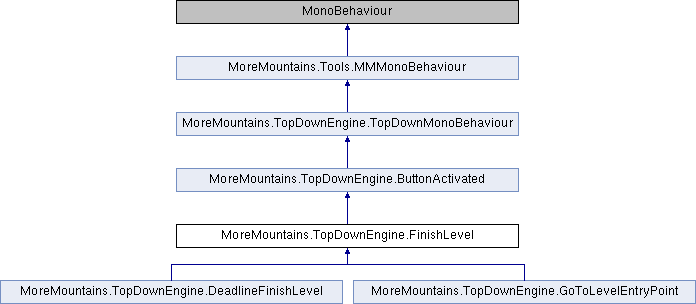
Add this class to a trigger and it will send your player to the next level.

 1.14.0