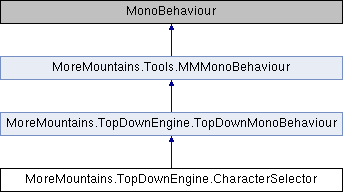
Add this component to a button (for example) to be able to store a selected character, and optionally to go to another scene You can see an example of its use in the DeadlineCharacterSelection demo scene
More...
Add this component to a button (for example) to be able to store a selected character, and optionally to go to another scene You can see an example of its use in the DeadlineCharacterSelection demo scene
◆ LoadNextScene()
| virtual void MoreMountains.TopDownEngine.CharacterSelector.LoadNextScene |
( |
| ) |
|
|
virtual |
Loads the next scene after having stored the selected character in the Game Manager.
◆ StoreCharacterSelection()
| virtual void MoreMountains.TopDownEngine.CharacterSelector.StoreCharacterSelection |
( |
| ) |
|
|
virtual |
Stores the selected character prefab in the Game Manager
◆ CharacterPrefab
| Character MoreMountains.TopDownEngine.CharacterSelector.CharacterPrefab |
◆ DestinationSceneName
| string MoreMountains.TopDownEngine.CharacterSelector.DestinationSceneName |
The documentation for this class was generated from the following file:

 1.8.18