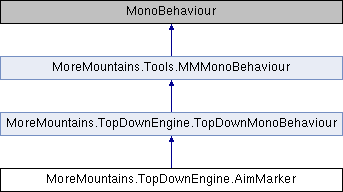
A class used to handle aim markers, (usually circular) visual elements
More...
|
| virtual void | Awake () |
| | On Awake we initialize our feedbacks and delay More...
|
| |
| virtual void | Update () |
| | On Update we check if we've changed target, and follow it if needed More...
|
| |
| virtual void | FollowTarget () |
| | Makes this object follow the target's position More...
|
| |
| virtual void | HandleTargetChange () |
| | Checks for target changes and triggers the appropriate methods if needed More...
|
| |
| virtual void | NoMoreTargets () |
| | When no more targets are found, and we just lost one, we play a dedicated feedback More...
|
| |
| virtual void | FirstTargetFound () |
| | When a new target is found and we didn't have one already, we play a dedicated feedback More...
|
| |
| virtual void | NewTargetFound () |
| | When a new target is found, and we previously had another, we play a dedicated feedback More...
|
| |
A class used to handle aim markers, (usually circular) visual elements
◆ MovementModes
the possible movement modes for aim markers
| Enumerator |
|---|
| Instant | |
| Interpolate | |
◆ Awake()
| virtual void MoreMountains.TopDownEngine.AimMarker.Awake |
( |
| ) |
|
|
protectedvirtual |
On Awake we initialize our feedbacks and delay
◆ Disable()
| virtual void MoreMountains.TopDownEngine.AimMarker.Disable |
( |
| ) |
|
|
virtual |
◆ FirstTargetFound()
| virtual void MoreMountains.TopDownEngine.AimMarker.FirstTargetFound |
( |
| ) |
|
|
protectedvirtual |
When a new target is found and we didn't have one already, we play a dedicated feedback
◆ FollowTarget()
| virtual void MoreMountains.TopDownEngine.AimMarker.FollowTarget |
( |
| ) |
|
|
protectedvirtual |
Makes this object follow the target's position
◆ HandleTargetChange()
| virtual void MoreMountains.TopDownEngine.AimMarker.HandleTargetChange |
( |
| ) |
|
|
protectedvirtual |
Checks for target changes and triggers the appropriate methods if needed
◆ NewTargetFound()
| virtual void MoreMountains.TopDownEngine.AimMarker.NewTargetFound |
( |
| ) |
|
|
protectedvirtual |
When a new target is found, and we previously had another, we play a dedicated feedback
◆ NoMoreTargets()
| virtual void MoreMountains.TopDownEngine.AimMarker.NoMoreTargets |
( |
| ) |
|
|
protectedvirtual |
When no more targets are found, and we just lost one, we play a dedicated feedback
◆ SetTarget()
| virtual void MoreMountains.TopDownEngine.AimMarker.SetTarget |
( |
Transform |
newTarget | ) |
|
|
virtual |
Sets a new target for this aim marker
- Parameters
-
◆ Update()
| virtual void MoreMountains.TopDownEngine.AimMarker.Update |
( |
| ) |
|
|
protectedvirtual |
On Update we check if we've changed target, and follow it if needed
◆ _lastTargetChangeAt
| float MoreMountains.TopDownEngine.AimMarker._lastTargetChangeAt = 0f |
|
protected |
◆ _movementDelayWFS
| WaitForSeconds MoreMountains.TopDownEngine.AimMarker._movementDelayWFS |
|
protected |
◆ _target
| Transform MoreMountains.TopDownEngine.AimMarker._target |
|
protected |
◆ _targetLastFrame
| Transform MoreMountains.TopDownEngine.AimMarker._targetLastFrame = null |
|
protected |
◆ FirstTargetFeedback
| MMFeedbacks MoreMountains.TopDownEngine.AimMarker.FirstTargetFeedback |
A feedback to play when a target is found and we didn't have one already.
◆ MovementCurve
| MMTween.MMTweenCurve MoreMountains.TopDownEngine.AimMarker.MovementCurve = MMTween.MMTweenCurve.EaseInCubic |
When in Interpolate mode, the curve to animate the movement on.
◆ MovementDelay
| float MoreMountains.TopDownEngine.AimMarker.MovementDelay = 0f |
When in Interpolate mode, the delay before the marker moves when changing target.
◆ MovementDuration
| float MoreMountains.TopDownEngine.AimMarker.MovementDuration = 0.2f |
When in Interpolate mode, the duration of the movement animation.
◆ MovementMode
The selected movement mode for this aim marker. Instant will move the marker instantly to its target, Interpolate will animate its position over time.
◆ NewTargetAssignedFeedback
| MMFeedbacks MoreMountains.TopDownEngine.AimMarker.NewTargetAssignedFeedback |
a feedback to play when we already had a target and just found a new one
◆ NoMoreTargetFeedback
| MMFeedbacks MoreMountains.TopDownEngine.AimMarker.NoMoreTargetFeedback |
a feedback to play when no more targets are found, and we just lost our last target
◆ Offset
| Vector3 MoreMountains.TopDownEngine.AimMarker.Offset |
an offset to apply to the position of the target (useful if you want, for example, the marker to appear above the target)
The documentation for this class was generated from the following file:
- F:/Github/Store/TopDownEngine/Assets/TopDownEngine/Common/Scripts/Characters/Weapons/AimMarker.cs

 1.8.18