|
| override void | SetMovement () |
| | Called every frame, if not on mobile, gets primary movement values from input More...
|
| |
| override void | SetSecondaryMovement () |
| | Called every frame, if not on mobile, gets secondary movement values from input More...
|
| |
| virtual void | ControlsModeDetection () |
| | Turns mobile controls on or off depending on what's been defined in the inspector, and what target device we're on More...
|
| |
| virtual void | ProcessButtonStates () |
| | Called at LateUpdate(), this method processes the button states of all registered buttons More...
|
| |
| virtual void | SetMovement (Vector2 movement) |
| | If you're using a touch joystick, bind your main joystick to this method More...
|
| |
| virtual void | SetSecondaryMovement (Vector2 movement) |
| | If you're using a touch joystick, bind your secondary joystick to this method More...
|
| |
| virtual void | SetHorizontalMovement (float horizontalInput) |
| | If you're using touch arrows, bind your left/right arrows to this method More...
|
| |
| virtual void | SetVerticalMovement (float verticalInput) |
| | If you're using touch arrows, bind your secondary down/up arrows to this method More...
|
| |
| virtual void | SetSecondaryHorizontalMovement (float horizontalInput) |
| | If you're using touch arrows, bind your secondary left/right arrows to this method More...
|
| |
| virtual void | SetSecondaryVerticalMovement (float verticalInput) |
| | If you're using touch arrows, bind your down/up arrows to this method More...
|
| |
| virtual void | SetCamera (Camera targetCamera, bool camera3D) |
| | Sets an associated camera, used to rotate input based on camera position More...
|
| |
| virtual void | SetCameraRotationInput (float newValue) |
| | Sets the current camera rotation input, which you'll want to keep between -1 (left) and 1 (right), 0 being no rotation More...
|
| |
| virtual Vector2 | ApplyCameraRotation (Vector2 input) |
| | Rotates input based on camera orientation More...
|
| |
| virtual void | ForceAllButtonStatesTo (MMInput.ButtonStates newState) |
| | Lets you force the state of all buttons in the InputManager to the one specified in parameters More...
|
| |
| virtual void | JumpButtonDown () |
| |
| virtual void | JumpButtonPressed () |
| |
| virtual void | JumpButtonUp () |
| |
| virtual void | DashButtonDown () |
| |
| virtual void | DashButtonPressed () |
| |
| virtual void | DashButtonUp () |
| |
| virtual void | CrouchButtonDown () |
| |
| virtual void | CrouchButtonPressed () |
| |
| virtual void | CrouchButtonUp () |
| |
| virtual void | RunButtonDown () |
| |
| virtual void | RunButtonPressed () |
| |
| virtual void | RunButtonUp () |
| |
| virtual void | ReloadButtonDown () |
| |
| virtual void | ReloadButtonPressed () |
| |
| virtual void | ReloadButtonUp () |
| |
| virtual void | InteractButtonDown () |
| |
| virtual void | InteractButtonPressed () |
| |
| virtual void | InteractButtonUp () |
| |
| virtual void | ShootButtonDown () |
| |
| virtual void | ShootButtonPressed () |
| |
| virtual void | ShootButtonUp () |
| |
| virtual void | SecondaryShootButtonDown () |
| |
| virtual void | SecondaryShootButtonPressed () |
| |
| virtual void | SecondaryShootButtonUp () |
| |
| virtual void | PauseButtonDown () |
| |
| virtual void | PauseButtonPressed () |
| |
| virtual void | PauseButtonUp () |
| |
| virtual void | TimeControlButtonDown () |
| |
| virtual void | TimeControlButtonPressed () |
| |
| virtual void | TimeControlButtonUp () |
| |
| virtual void | SwitchWeaponButtonDown () |
| |
| virtual void | SwitchWeaponButtonPressed () |
| |
| virtual void | SwitchWeaponButtonUp () |
| |
| virtual void | SwitchCharacterButtonDown () |
| |
| virtual void | SwitchCharacterButtonPressed () |
| |
| virtual void | SwitchCharacterButtonUp () |
| |
|
| TopDownEngineInputActions | InputActions |
| | a set of input actions to use to read input on More...
|
| |
| override Vector2 | MousePosition => Mouse.current.position.ReadValue() |
| | the position of the mouse More...
|
| |
| bool | InputDetectionActive = true |
| | set this to false to prevent the InputManager from reading input More...
|
| |
| bool | ResetButtonStatesOnFocusLoss = true |
| | if this is true, button states will be reset on focus loss - when clicking outside the player window on PC, for example More...
|
| |
| string | PlayerID = "Player1" |
| | a string identifying the target player(s). You'll need to set this exact same string on your Character, and set its type to Player More...
|
| |
| bool | AutoMobileDetection = true |
| | if this is set to true, the InputManager will try to detect what mode it should be in, based on the current target device More...
|
| |
| InputForcedModes | InputForcedMode |
| | use this to force desktop (keyboard, pad) or mobile (touch) mode More...
|
| |
| bool | ForceWeaponMode = false |
| | if this is true, the weapon mode will be forced to the selected WeaponForcedMode More...
|
| |
| WeaponAim.AimControls | WeaponForcedMode |
| | use this to force a control mode for weapons More...
|
| |
| bool | HideMobileControlsInEditor = false |
| | if this is true, mobile controls will be hidden in editor mode, regardless of the current build target or the forced mode More...
|
| |
| MovementControls | MovementControl = MovementControls.Joystick |
| | use this to specify whether you want to use the default joystick or arrows to move your character More...
|
| |
| bool | ForceDesktopIfPrimaryAxisActive = false |
| | if this is true, the mobile controls will be hidden when the primary desktop axis is active, and the input manager will switch to desktop inputs More...
|
| |
| bool | AutoRevertToMobileIfPrimaryAxisInactive |
| | if this is true, the system will revert to mobile controls if the primary axis is inactive for more than AutoRevertToMobileIfPrimaryAxisInactiveDuration More...
|
| |
| float | AutoRevertToMobileIfPrimaryAxisInactiveDuration = 10f |
| | the duration, in seconds, after which the system will revert to mobile controls if the primary axis is inactive More...
|
| |
| bool | SmoothMovement =true |
| | If set to true, acceleration / deceleration will take place when moving / stopping. More...
|
| |
| Vector2 | Threshold = new Vector2(0.1f, 0.4f) |
| | the minimum horizontal and vertical value you need to reach to trigger movement on an analog controller (joystick for example) More...
|
| |
| bool | RotateInputBasedOnCameraDirection = false |
| | if this is true, any directional input coming into this input manager will be rotated to align with the current camera orientation More...
|
| |
| virtual Vector2 | MousePosition => Input.mousePosition |
| | the position of the mouse More...
|
| |
|
| override void | Awake () |
| | On Awake we run our pre-initialization More...
|
| |
| override void | Initialization () |
| | On init we register to all our actions More...
|
| |
| virtual void | TestForceDesktop () |
| |
| virtual void | Update () |
| | At update, we check the various commands and update our values and states accordingly. More...
|
| |
| virtual void | TestAutoRevert () |
| |
| virtual void | BindButton (InputAction.CallbackContext context, MMInput.IMButton imButton) |
| | Changes the state of our button based on the input value More...
|
| |
| override void | GetInputButtons () |
| | If we're not on mobile, watches for input changes, and updates our buttons states accordingly More...
|
| |
| override void | SetShootAxis () |
| | Called every frame, if not on mobile, gets shoot axis values from input More...
|
| |
| override void | SetCameraRotationAxis () |
| | Grabs camera rotation input and stores it More...
|
| |
| override void | TestPrimaryAxis () |
| |
| virtual void | OnEnable () |
| | On enable we enable our input actions More...
|
| |
| virtual void | OnDisable () |
| | On disable we disable our input actions More...
|
| |
| virtual void | Start () |
| | On Start we look for what mode to use, and initialize our axis and buttons More...
|
| |
| virtual void | PreInitialization () |
| | Initializes buttons and axis More...
|
| |
| virtual void | InitializeButtons () |
| | Initializes the buttons. If you want to add more buttons, make sure to register them here. More...
|
| |
| virtual void | InitializeAxis () |
| | Initializes the axis strings. More...
|
| |
| virtual void | LateUpdate () |
| | On LateUpdate, we process our button states More...
|
| |
| virtual void | GetLastNonNullValues () |
| | Gets the last non null values for both primary and secondary axis More...
|
| |
| void | OnApplicationFocus (bool hasFocus) |
| | If we lose focus, we reset the states of all buttons More...
|
| |
| virtual void | InitializeSingleton () |
| | Initializes the singleton. More...
|
| |
|
| enum | InputForcedModes { InputForcedModes.None,
InputForcedModes.Mobile,
InputForcedModes.Desktop
} |
| | the possible modes for this input manager More...
|
| |
| enum | MovementControls { MovementControls.Joystick,
MovementControls.Arrows
} |
| | the possible kinds of control used for movement More...
|
| |
| static T | TryGetInstance () |
| |
| static bool | HasInstance |
| |
| static T | Current |
| |
| static void | InitializeStatics () |
| | Statics initialization to support enter play modes More...
|
| |
| Camera | _targetCamera |
| |
| bool | _camera3D |
| |
| float | _cameraAngle |
| |
| List< MMInput.IMButton > | ButtonList |
| |
| Vector2 | _primaryMovement = Vector2.zero |
| |
| Vector2 | _secondaryMovement = Vector2.zero |
| |
| float | _cameraRotationInput = 0f |
| |
| string | _axisHorizontal |
| |
| string | _axisVertical |
| |
| string | _axisSecondaryHorizontal |
| |
| string | _axisSecondaryVertical |
| |
| string | _axisShoot |
| |
| string | _axisShootSecondary |
| |
| string | _axisCamera |
| |
| float | _primaryAxisActiveTimestamp |
| |
| static T | _instance |
| |
| virtual bool | IsMobile [get, protected set] |
| | if this is true, we're currently in mobile mode More...
|
| |
| virtual bool | IsPrimaryAxisActive [get, protected set] |
| |
| virtual MMInput.IMButton | JumpButton [get, protected set] |
| | the jump button, used for jumps and validation More...
|
| |
| virtual MMInput.IMButton | RunButton [get, protected set] |
| | the run button More...
|
| |
| virtual MMInput.IMButton | DashButton [get, protected set] |
| | the dash button More...
|
| |
| virtual MMInput.IMButton | CrouchButton [get, protected set] |
| | the crouch button More...
|
| |
| virtual MMInput.IMButton | ShootButton [get, protected set] |
| | the shoot button More...
|
| |
| virtual MMInput.IMButton | InteractButton [get, protected set] |
| | the activate button, used for interactions with zones More...
|
| |
| virtual MMInput.IMButton | SecondaryShootButton [get, protected set] |
| | the shoot button More...
|
| |
| virtual MMInput.IMButton | ReloadButton [get, protected set] |
| | the reload button More...
|
| |
| virtual MMInput.IMButton | PauseButton [get, protected set] |
| | the pause button More...
|
| |
| virtual MMInput.IMButton | TimeControlButton [get, protected set] |
| | the time control button More...
|
| |
| virtual MMInput.IMButton | SwitchCharacterButton [get, protected set] |
| | the button used to switch character (either via model or prefab switch) More...
|
| |
| virtual MMInput.IMButton | SwitchWeaponButton [get, protected set] |
| | the switch weapon button More...
|
| |
| virtual MMInput.ButtonStates | ShootAxis [get, protected set] |
| | the shoot axis, used as a button (non analogic) More...
|
| |
| virtual MMInput.ButtonStates | SecondaryShootAxis [get, protected set] |
| | the shoot axis, used as a button (non analogic) More...
|
| |
| virtual Vector2 | PrimaryMovement [get] |
| | the primary movement value (used to move the character around) More...
|
| |
| virtual Vector2 | SecondaryMovement [get] |
| | the secondary movement (usually the right stick on a gamepad), used to aim More...
|
| |
| virtual Vector2 | LastNonNullPrimaryMovement [get, set] |
| | the primary movement value (used to move the character around) More...
|
| |
| virtual Vector2 | LastNonNullSecondaryMovement [get, set] |
| | the secondary movement (usually the right stick on a gamepad), used to aim More...
|
| |
| virtual float | CameraRotationInput [get] |
| | the camera rotation axis input value More...
|
| |
| virtual float | CameraAngle [get] |
| | the current camera angle More...
|
| |
| static T | Instance [get] |
| | Singleton design pattern More...
|
| |
This is a replacement InputManager if you prefer using Unity's InputSystem over the legacy one. Note that it's not the default solution in the engine at the moment, because older versions of Unity don't support it, and most people still prefer not using it You can see an example of how to set it up in the MinimalScene3D_InputSystem demo scene

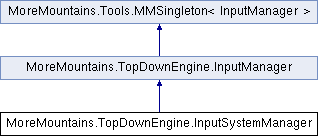
 Public Member Functions inherited from MoreMountains.TopDownEngine.InputManager
 1.8.18